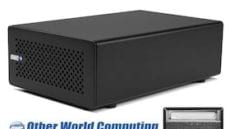
Other World Computing announced today that both the OWC Aura Pro 6G SSD Storage Line and the OWC Mercury Helios PCI Expansion Chassis were named as finalists in the Visionary Products Awards category of the Storage Visions 2013 Awards program. The awards program, held January 6, 2013, at the 12th annual Storage Visions Conference at the 2013 Consumer Electronics Show (CES) in Las Vegas, Nevada, recognized companies advancing the state of the art in storage technologies utilized in consumer electronics, the media and entertainment industries, and visionary products for the digital content value chain. Article Continues…
Tag-Archive for » expansion «
OWC Mercury Aura Pro 6G Solid State Drive and OWC Mercury Helios PCI Expansion Chassis Named Visionary Product Award Finalists At Storage Visions Conference
More Instructional Videos Posted.
Among our various video endeavors, our Instructional Series of videos is probably the most well-regarded. After all, how can you not like free, step-by-step instructions on upgrading your Mac?
Continuing in our pursuit of providing you with the most comprehensive instructional set offered by any source, we’ve added a couple more videos to the list. 2012 Mac mini owners are the beneficiaries this time around, with a pair of videos showing how to upgrade the Memory, and how to install a second internal drive by way of an OWC Data Doubler kit.
As always, you can find these new videos in our Tech Center, as well as on our YouTube channel, with an iTunes version to come in the near future.
Oh… and while we’re talking about videos, don’t forget to vote for OWC in the 2013 Meet Me at CES Video Contest. There’s only a few days left, so make sure to vote for us daily and let all of CES see the OWC Difference.
OWC Introduces Mercury Helios PCIe Thunderbolt Expansion Chassis
Other World Computing announced today the OWC Mercury Helios PCIe Thunderbolt Expansion Chassis as the solution for using half-length professional-level PCIe 2.0 adapter cards with Mac mini, iMac, MacBook Air, MacBook Pro, and other Thunderbolt-equipped computers that do not have PCIe slots due to size and/or design limitations.
More Users Can Now Tap Into Power of PCIe and Thunderbolt
Desktop workstations used to be the only way computer users could access high-performance PCIe cards made for video capture/editing, media transcoding, audio processing, and data storage. Now, with Mercury Helios, users of portable and all-in-one computers can enjoy the functionality and productivity gains of these PCIe cards wherever their work takes them. Article Continues…
Making Music Without An ExpressCard
Can’t always get what you want…
In an earlier post, we discussed the removal of the ExpressCard/34 slot from the 15″ MacBook Pro and the implications of that loss:http://blog.macsales.com/1391-apple-giveth-apple-taketh-away
As music production becomes more commonplace outside of the studio walls, musicians have become more and more dependent on the power and portability of the notebook. It’s this need for a high performance machine that has made the MacBook Pro a staple for creative professionals. Up until recently, increased features have been packed into these machines. However, it seems that some of the features we’ve all come to know and love have been taken away from the most recent additions of the MBP product line -namely the second FireWire bus and expansion capabilities of the ExpressCard slot. So, before we start crying “the sky is falling,” we need to answer three very important questions:
- What have we lost?
- What do we need?
- What do we have?
We’ve lost expandability, we need sufficient bandwidth for our work flow, and we DO in fact have just that.
…but if you try sometimes…
All we have to do is re-assess our storage and interface requirements. When recording music, you have to remember that audio data is substantially smaller than video. Therefore, the bandwidth provided by FireWire 400 or USB 2.0 speeds is more than sufficient for most. So what’s the bottom line? You have two practical configurations for your new 15″ MacBook Pro:
- USB 2.0 Audio Interface and FW 800 (or 400) External HD
- FireWire 400 Audio Interface and FireWire 400 External HD (daisy chained)
…you get what you need.
In looking at the two configurations above, there is a method to the madness. Option #1 gives you more bandwidth for your external hard drive, which can be useful for projects utilizing MIDI & virtual instrument libraries that require more resources for disk streaming. Being a musician myself, I completely understand the hesitation involved when “USB” is mentioned. In the past, USB has always been considered “the slow interface.” It’s because of this that I will mention that the new MBP’s have been bench-marked having much higher “real world” throughput than earlier models. Therefore, you will see little to no performance loss when using a USB audio interface as opposed to FireWire. So, you can think of Option #1 as your “MIDI Workstation” scenario.
Option #2 allows you to still keep a useful FW400 speed for your external HD, while using a FW400 audio interface (note: when daisy chaining a FW400 device with a FW800 device, both devices will be functioning at a FW400 speed). Currently, most audio interfaces that utilize a FireWire connection are FW400 so you’re not losing any performance on that end. The benefit of these interfaces are that they are typically built to handle more simultaneous audio input for multi-tracking than their USB counterparts. You can think of Option #2 as your “portable live audio recording scenario.”
This takes care of our USB and FireWire issues, but what about the loss of other potential ExpressCard expansions? Some companies have developed ExpressCard upgrades for audio professionals that use their laptops in a production setting. Are these upgrades and expansions worthless now? Absolutely not! However, if you need to utilize these professional additions you’ll need to purchase the new 17″ MacBook Pro which still provides the user with an ExpressCard slot. For those of you that don’t want to lug a monstrous 17″ notebook around, your only other alternative is to purchase an earlier version of the MacBook Pro which are still incredibly viable machines for audio/music professionals.
Mr. Jobs and the gang threw us quite a curve ball with this recent feature loss, but have no fear! OWC is here to light the way through these murky waters of change to help you audio professionals get the most out of your hardware. You can still make music without an ExpressCard!
Apple Giveth, Apple Taketh Away…
Last week, my esteemed co-blogger, OWC Michael, posted his findings on the new MacBook Pros. While I agree with him that they’re pretty nice machines, I do take exception to the assertion that removal of the ExpressCard/34 slot from the 15” MacBook Pro isn’t that much of a loss.
The main thing we lose is versatility. That expandability was what many people (myself included) saw as the main delimiter between the “consumer” and the “pro” lines – not the materials or the size. The Mac Pro has expansion options via PCI Express cards, and the MacBook Pros had the ExpressCard/34 slot. The iMac, the Mac mini, and the MacBook don’t have these options.
With the notebook replacing the desktop machine as many users’ primary computer, this expandability is a key option to many Power Users. The simplest example is for those who use an ExpressCard for wireless connectivity. Most of the major cell phone companies I checked offer an option to connect to their wireless data networks via an ExpressCard, yet none offered one in an SD format. This is a major snag for those who do a lot of traveling and can’t rely on an available WiFi hotspot for communication.
Then, there is also the versatility in storage. As I mentioned before, there are a lot of people who use their notebooks as a desktop replacement. With this use often comes the need (or at least desire) for faster data connection. While FireWire 800 is a nice, fast option, sometimes you need something a little faster – like eSATA. There are a number of eSATA ExpressCards available for fast connection, several of which also support multiple drives.
If FireWire 800 is fast enough enough for you (and, admittedly, for many it is), there’s still only one port on the MacBook Pro. What happens if you have more than one FireWire device you’d like to use at one time? Sure, you can daisy-chain the devices together, but if there’s a single FW400 device in that chain, it reduces all the devices on that chain to FireWire 400 speeds. A simple FireWire ExpressCard allows you to connect multiple FireWire devices without any worry over loss of speed.
Technically, if you have one of the new MacBook Pros and need an ExpressCard/34 slot, you can use a USB to ExpressCard adapter. However, the down side to this is that, rather than the 2.5Gb/s maximum transfer rate of a native ExpressCard/34 interface, you’re limited USB 2.0’s theoretical maximum of 480Mb/s – and we all know that USB speeds usually test considerably slower than that in OS X.
So what about that SD card slot we got in exchange? It’s “okay,” if all your devices use SD cards. However, what about users with cameras or other devices that use Compact Flash (like my Canon EOS Rebel Ti), Sony’s “Memory Stick”, or any of a myriad of other cards? They still need an external USB adapter, making that SD card slot all but useless until you shell out more cash for a new camera/phone/gadget.
I can hear a lot of you saying, “If the ExpressCard/34 slot is so important, then why not just go with the 17” MacBook Pro?”
The answer to this is twofold – price and portability. The 17” MacBook Pro is about $200 more expensive than its 15” counterpart. While that’s not too much more (less than 8%), the “portability” factor also comes into play.
While the extra screen real estate is nice, it comes at the expense of portability. It becomes a tight fit in many laptop bags (often not fitting at all) and on an airplane (especially if you’re flying “coach”), you’ll be lucky if you can open the screen all the way. This is much less the case with the 15” model. Trading that convenience for a ExpressCard/34 slot is counterproductive to the whole point behind having a “pro” notebook in the first place – portability with expandability.
In conclusion, while I’m rather excited about many of the features of the new MacBook Pros, the loss of the ExpressCard/34 slot has me looking in the “Refurb” section of the Apple Store until this oversight is corrected.