OWC Blog - blog.macsales.com

Tag-Archive for » Qx2 «

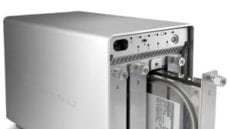
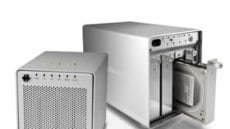
OWC Mercury Elite-AL Pro Qx2 High Performance Plug And Play Hardware RAID Data Storage/Backup Solution Now Offers Up To 12TB

Tuesday, December 28th, 2010 | Author: OWC NewsFeed

Other World Computing announced today it has expanded the OWC Mercury Elite-AL Pro Qx2 desktop hardware RAID storage line storage capacity to 12TB by utilizing four 3TB high performance hard drives in the Qx2’s four hot swappable drive bays. In addition to offering massive storage/backup capacity in a desktop sized footprint, the Mercury Elite-AL Pro Qx2 features a “Quad Interface” of FireWire® 800, FireWire 400, USB 2.0, and eSATA ports and four selectable Hardware RAID settings – 0, 1, 5, 10 – for high speed, highly reliable Plug and Play use with Macs and PCs.

Four Prosumer Models Starting At $479.99

  • 2TB OWC Mercury Elite-AL Pro Qx2 (500GB x 4 w/64MB cache) & three year warranty - $479.99

  • 4TB OWC Mercury Elite-AL Pro Qx2 (1TB x 4 w/128MB cache) & three year warranty –  $579.99

Currently on year end special for Article Continues…

Category: Press Releases

OWC’s RAID solutions now feature 3.0TB Drives!

Friday, November 19th, 2010 | Author: OWC NewsFeed

Even as prices on ultra-fast SSDs continue to wind their way down, the capacity on traditional, platter-based hard drives increases.

Earlier in the month, Western Digital announced a 3.0TB hard drive. Not long afterward, Hitachi came out with their own 3.0TB drive. OWC uses Hitachi drives in most of our external storage solutions so adding this 3.0TB model to our lineup is a natural for us.

While various limitations mean we can’t put this drive into every model we carry, we are able to offer the following RAID solutions with this new bad boy:

Get the absolute maximum in all-in-one storage for your system with OWC!

Price Drops on the Qx2 makes capacity and performance even more affordable.

Friday, August 20th, 2010 | Author: OWC NewsFeed

Whether you’re a high-end user who needs fast data capture/retrieval capabilities or a home user who would like a safe, easy-to-use backup drive, this latest round of price drops on the OWC Mercury Elite-AL Pro Qx2 may be just what you’ve been waiting for.

The OWC Mercury Elite-AL Pro Qx2 is a High-Performance, Redundant, RAID Solution for your high capacity needs of up to 8.0TB. This 4-bay solution can be configured in RAID 0,1,5,10 or non-RAID SPAN modes easily.The Qx2 features a “Quad” interface allowing you to connect via FireWire 800, FireWire 400, USB2, or eSATA.

Other key features include:

  • Solutions Pre-configured & Pre-Tested in RAID-5 Mode (Striped with Data Protection/Redundancy)
  • Multi-Hour Burn-in/Testing performed on all Qx2 drive arrays prior to shipping
  • User Selectable Hardware RAID 0/1/5/10 & Non-RAID modes
  • Sustained Data Rates of up to/over 240MB per Second
  • RAID Mode, Status, and Access Indicator LEDs
  • Drive Status Alarm in case of drive failure
  • Four(4) removable 3.5” SATA II drive bays
  • Locking Front Cover
  • Quad-Interface (2 FW800 ports, 1 FW400 port, 1 USB 2.0 port, 1 eSATA port)
  • Ideal for Audio/Video including HD Video, Backup (including Time Machine), Music, Photography, & More!
  • Fully Mac, Windows, and Linux Compatible
  • Cables for all supported interfaces included
  • Prosoft Data Backup 3(OS X), NovaStor NovaBackup(Windows), Carbon Copy  Cloner(OS X, Intech HD Speedtools Utility Suite(Mac OS 8.6 to 10.6.x) included
  • Industry Leading 3 Year Solution Warranty

Of course, we’re not stopping there. To go along with all these great features, we’ve also got some great new prices. Article Continues…

June 9, 2000 – Mercury makes its appearance.

Wednesday, June 9th, 2010 | Author: OWC NewsFeed

The original OWC Mercury FireWire Drive

Not many people are aware of it, but today is a pretty special day. On June 9, 2000, OWC introduced it’s first FireWire equippped storage solutions: the OWC Mercury and OWC Mercury Plus, which featured 5400 and 7200rpm drives, respectively.

Of course the Mercury series of drives didn’t stop there. As all good things do, it evolved and grew over time. After the Mercury and Mercury Plus came the Mercury Elite and the Mercury Elite Pro (a line that lives on as the Mercury Elite Pro Classic). Those lines saw the addition of FireWire 800 as the new high-speed connection.

Then, came the Mercury Elite-AL Pro, which were closely followed by the Mercury Elite-AL Pro RAID models. The most recent addition to the OWC Mercury family of desktop drives is, of course, the OWC Mercury Elite-AL Pro Qx2. All these drives not only feature FireWire and FireWire 800 interfaces, but also have USB 2.0 and eSATA ports available for wider flexibility in connecting to your computer. Article Continues…

TGIF (Thank God It’s Falling in price): Elite-AL Pro Qx2

Friday, May 28th, 2010 | Author: OWC NewsFeed

The OWC Mercury Elite-AL Pro Qx2 is the High-Performance, Redundant, RAID Solution for your high capacity needs of up to 8.0TB. Shipped default with RAID-5 mode enabled, this 4 bay solution allows the user to change/select between the RAID 0,1,5,10 and non-RAID SPAN modes that are fully hardware supported. Regardless of the mode of use selected, the Qx2 is plug & play accessible via its FireWire 800, FireWire 400, USB2, or eSATA interfaces as per the best option/interface the user prefers to make use of based on the computer being connected to.

High-Performance, Flexibility, and Redundancy – all at a very competitive cost per gig + with extreme ease of use/plug & play simplicity.

Qx2 Key Features:

  • Solutions Pre-configured & Pre-Tested in RAID-5 Mode (Striped with Data Protection/Redundancy)
  • Multi-Hour Burn-in/Testing performed on Qx2 drive array prior to shipping
  • User Selectable Hardware RAID 0/1/5/10 & Non-RAID modes
  • Sustained Data Rates of up to/over 240MB per Second
  • RAID Mode, Status, and Access Indicator LEDs
  • Drive Status Alarm for drive failure
  • 4 x SATA II 3.5” Drive Bays (Removable)
  • Locking Front Cover
  • Quad-Interface (FW800x2, FW400x1, USB2x1, eSATAx1) Article Continues…

Product News & Reviews You Can Use

Friday, December 4th, 2009 | Author: OWC Grant

OWCNewsGrantTalk about a rhyming headline! While I hope I have more talent than a certain flavor of Vanilla, I don’t think I can top this character. But to the point, we’ve had a busy last few days here transforming Cyber Monday into a full Cyber Week because of popular demand.

As a result, we haven’t really had the opportunity to get back to the tech tips and product reviews that you, our faithful readers, have come to expect at the OWC Blog. But much like the myriad of fan movies and fan fiction that sprout up when the original isn’t producing as quickly as fans demand, this past week we’ve received some absolutely glowing product reviews from media experts on some of our latest product lines.

From Steven Sande at TUAW, The Unofficial Apple Weblog “Road Tested: Newer Technology NuPower Charge & Sync+”

NWTCHRGNSYNCTechnology came out with a new and rather innovative device last month that I thought was so different from the pack that I ended up buying one for myself. The NuPower Charge & Sync+ packs almost everything you need, including the AC adapter and charger, a 1400 mAh Lithium-Ion battery pack, and a USB charging cable, into one small package.

From Jim Dalrymple at The Loop, Making Sense of Technology “Hands On: OWC Mercury Elite-AL Pro Qx2 external RAID”

I’ve been testing Other World Computing’s (OWC) Mercury Elite-AL Pro Qx2 RAID system for the past few weeks and have been very impressed…I started off just recording one track of guitar with no plug-ins — admittedly, a pretty simple test, but it worked just fine. Typically, I usually record a couple of guitar tracks — either from mics or digitally — at the same time.

OWCMEQX2T8.0SThe last song I worked on had over 60 tracks that were used at different times during the project. Most of the tracks were recorded audio (guitars, drums, french horns, violins, etc.) that were recorded directly to the drive.

But that’s not all. I also have many gigabytes of drum data from Toontrack’s drum kits stored on the drive. So, not only is Pro Tools reading and recording audio from the drive at the same time, it is also regularly reading files for the drum kits as well.

After a few small tests, I let loose and used the Elite for everything. It stood up to everything I threw at it and continues to.

It’s not only the big reviewers that are getting into the fray…we love to see you readers/followers/fans speak out as well. From @NeedApple on Twitter:

Got a drobo to pool all my video drives. Sending back drobo – it’s slow as molasses!! Getting OWC Mercury Qx2 instead, much better ratings.

Among our craziness here at work we even managed to release a brand new product line, the OWC Mercury Elite-AL Pro mini this week:

OWCMEQMSSD256OWC has announced a new line of portable hard drives. The new Mercury Elite-AL Pro mini line features aluminum cases, bus powered drives, and quad interfaces.

The Mercury Elite-AL Pro mini case design is a smaller version of the case used in OWC’s Mercury Elite-AL Pro line, so it’s a familiar design to OWC customers. The Mercury Elite-AL Pro mini case measures 3.8 by 5.5 by 1.1 inches, small enough to stash in a laptop bag or backpack.

But don’t just take our word for it, read more about the Elite-AL Pro mini from Roman Loyola at Macworld.com

And is my style to end in fun, I’ll refer back to the post beginning…am I better than the “one and done”?

RAID for the rest of us. The adventures of Little Johnny.

Monday, September 21st, 2009 | Author: OWC Michael

JohnnyBoardBreaking it down to its simplest forms, there are two main reasons to add a RAID setup to your computer system. Performance and Redundancy.

Let’s break these down individually:

Little Johnny was acting up in class and his teacher made him sit in the hallway while all the other kids went to recess. If he could finish writing “I will not put frogs in the teacher’s desk ever again” 100 times on paper before the rest of his classmates came back to class, little Johnny would be able to join them in the playground. Article Continues…

Category: Tech Tips

A little bit Mirrored, a little bit Striped.

Monday, July 6th, 2009 | Author: OWC Chris S.

Looks like the NewerTech Voyager isn’t the only one getting the all the reviewers’ love. OWC’s Mercury Elite-AL Pro Qx2 is pulling in the accolades, as well.

We haven’t really talked a whole lot about the Qx2 on the OWC Blog, and that’s kind of a shame, because it’s a product I really, really like. In short, it is an easy-to-use, multi-drive storage solution.

External storage is insanely useful, especially for backups. In most cases, your standard single drive external storage solution will serve you well. However, while single-drive options are inexpensive, they are limited in speed and redundancy.

For FireWire and USB 2.0, most drives will be bottlenecked by the connection bus. With eSATA, though, the drive mechanism itself becomes the limiting factor, relying on how fast the drive itself can access the data. While OWC Storage Solutions use high-quality drive mechanisms, we have yet to find a single drive that can take up the entire SATA bus’s bandwidth.

The other place where single drives are limited is in data redundancy. When a drive eventually fails (which, granted, can be years from now), all the data on the drive is lost. Regular backups and/or clones are ways of getting around this, but they also are limited to only being as up-to-date as the last time they were run.

Both these limitations can be addressed by the use of a RAID device, such as the Qx2.

A little bit about RAID

For those of you who don’t know the term, RAID stands for “Redundant Array of Independent Disks.” Effectively, multiple hard drives are connected together and appear as one large volume on your desktop. There are a number of different RAID types, each with different levels of redundancy and speed.

RAID 0 (Striped) – This addresses the speed limitations of a single drive, and is a great choice for instances where fast data access is needed, such as video and audio capture. Data is split into blocks over two or more drives at same time for high speed and large capacity. However, if one drive goes down, the whole RAID array is ruined. Technically, you could say that this is not a “RAID,” as it eliminates the “Redundant” part. But that would be nit-picky, and nobody likes people like that.

RAID 1 (Mirrored) - This addresses redundancy issues, and is best for when you have data you can’t afford to lose to hardware failure. In this mode, data is written simultaneously to to two different drives. If one drive goes down, you still have a second copy. The down side to this is that you effectively lose half your total drive capacity.

RAID 10 (1+0) - This RAID level combines both RAID 0 and RAID 1, effectively layering one over the other. While you still maintain the speed of a RAID 0 and gain the redundancy of RAID 1, you still have the loss in capacity mentioned of RAID 1, only now you have TWO drives you lose the capacity of.

RAID 5 (Striped with Redundancy) - This is a slight variation on RAID 10, which addresses the capacity loss. In RAID 5, data is striped between 3 or more disks, with only one drive’s worth of data being lost to redundancy. In effect, the more Disks the RAID array has, the more space-efficient the RAID’s redundancy function becomes. For a more detailed description of how RAID 5 works, check out this informational PDF.

There are, of course, other RAID levels, such as RAID 6, RAID 0+1 & RAID 53, but they’re mostly just variants or combinations of these major ones.

RAID-in-a-Box

The Mercury Elite-AL Pro Qx2 makes adding RAID functionality and massive capacity up to 8TB to your system incredibly simple. All you need to do is put four identical drives into the Qx2 case (or select one of the pre-configured complete solutions), and select the type of RAID you want  (it comes pre-set as RAID 5…which is my personal preference incidently). After a few moments, the Qx2 will configure itself and you can then attach it to your computer via the connection of your choice, where it will behave just like any other external device.

I won’t kid you, the Qx2 isn’t for everybody. In fact, for many, a simpler solution may be more useful. For those in a “small office” situation or power users with more advanced storage needs, though, this may be just what you’re looking for.

Category: Tech Tips