OWC Blog - blog.macsales.com

Tag-Archive for » speed «

More Memory = A Faster Mac

Saturday, December 1st, 2012 | Author: OWC Jarrod

Everything is better when it’s faster: cars, amusement park rides, food. Well, maybe not food. But the point is, when things are faster, it leaves more time for you to spend on more important things. Unfortunately, your computer isn’t always able to deliver the maximum speed it’s capable of. Working with large images in Photoshop, converting music and movies for your favorite device, even simple tasks like scrolling in Word – these can all take much longer than they should.

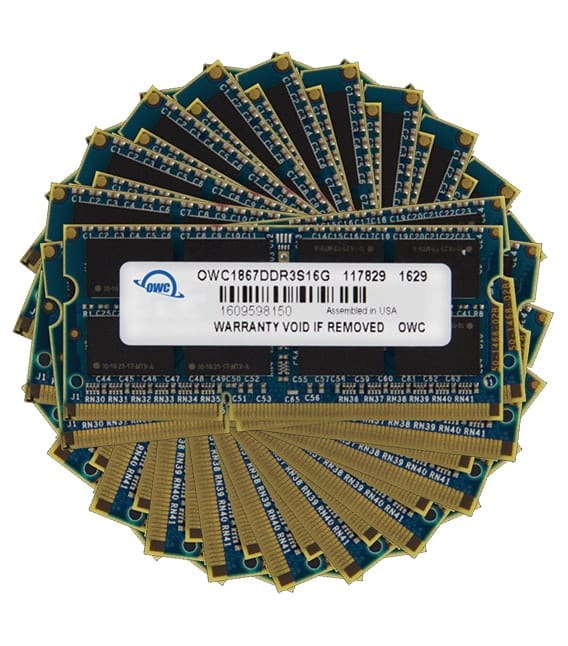
But lucky for you, one of the easiest ways to bring more speed into your life is by adding more RAM to your Macand no one has that covered better than OWC.

To find out how you can turbo-boost your Mac, all you need to do is find out your machine’s Model ID. Then, use our easy guide to find out just how much more memory you can add and what it might cost. Finally, we offer free, straight-forward installation videos to help you “DIY” a memory install with almost any Mac…and often in 20 minutes or less!

It’s really that easy. So what are you waiting for? Hurry up and get started on upgrading your Mac with performance-test proven, Lifetime Warrantied memory today!

Maximizing Performance in the 2012 Mac mini.

Tuesday, November 6th, 2012 | Author: OWC NewsFeed

Many of us here at the OWC Blog are big fans of the Mac mini, and the latest version is no exception. It packs a lot of punch in its diminutive frame, and for many users, it may just be all the computer they need.

To see just how well the new Mac mini can perform with certain OWC upgrades, Lloyd Chambers of Mac Performance Guide has put it through his battery of tests, and the results show that the mini can be considered as viable workstation solution for Photoshop and Lightroom power-users. Using an OWC 6G SSD doubles the performance in his tests compared to the Apple 1TB hard drive, and using an OWC Helios + Accelsior Solution via Thunderbolt is even faster…how’s a speed improvement of 70% grab ‘ya?

Check out Lloyd’s full writeup for all the performance insights.

By The Numbers: What Can An OWC 6G SSD Do For Your 2011 Mac mini?

Wednesday, August 3rd, 2011 | Author: OWC Michael

Our benchmarking has been completed on the latest round of Mac mini machines from Apple. We teased a bit with our post from last Friday exclaiming that the OWC 6G SSDs work with the new 2011 Mac mini.

In our excitement on discovering the functionality of the drives, we posted screenshots of a few of our test results, but we wanted to put what that means for you into perspective.

The chart above shows the average read/write speeds as reported by QuickBench in four increasingly beneficial drive configurations in our 2.5GHz Intel Core i5 Mac mini (RAID 0 configuration results obtained from a 2.0GHz Intel Core i7 Mac mini Server as that is the only machine that comes factory stock with two available drive ports.) Article Continues…

2011 Mac mini works with OWC 6G SSDs

Friday, July 22nd, 2011 | Author: OWC Chris S.

After extensive testing, we’re glad to announce that both the OWC Mercury EXTREME Pro 6G line and our Mercury Electra 6G line of SSDs are fully compatible with the 6Gb/s SATA 3.0 ports on both the 2011 Mac mini and the 2011 Mac mini Server.

Both drive models work great, without the dropouts and other inconsistencies that we have seen in the 17” 2011 MacBook Pros.

Like its predecessor, the 2011 Mac mini Server has two drive bays, which can see the drives individually or in a software RAID 0 or 1. We tested a pair of Mercury EXTREME Pro 6G SSDs set up in a RAID 0 inside the mini Server and achieved read/write speeds over 1000MB/s!

The “regular” Mac mini only comes with a single drive installed. It appears, though, that a dual drive setup is certainly doable (though we can’t really comment on it until we look into it more, so please don’t even ask - just keep checking back; we’ll post it when we know for sure).

However, since the “regular” Mac mini comes as a single-drive unit, that’s how we tested it. It didn’t disappoint, either, getting speeds of over 500MB/s Read and over 420MB/s Write using one of the EXTREME Pro 6G’s.

You can see the results of both series tests below.

As you can see by these scores putting a 6Gb/s-capable SSD (or SSDs) in your 2011 Mac mini or Mac mini Server, really helps it achieve fullest the data transfer speeds possible.


What Can An OWC SSD Do For You?

Wednesday, May 25th, 2011 | Author: OWC Ryan

Hey guys and gals out there… I work at OWC, but I’m just a warehouse guy. I’m certainly no “power user”, but luckily for me, the powers that be decided to let me test drive an OWC Mercury EXTREME Pro 6G SSD in a 2.0GHz 2011 MacBook Pro for them anyway…and all I can say is WOW!

My work consists of very frequent use of browsers, database applications, PDFs, spreadsheets, and the like. I usually have 5-12 apps running at any given time, and am always switching frequently between them.

Folks told me I “wouldn’t really” benefit from the additional speed the OWC Pro 6G SSD offered. All I can say is… well… “Wrong!Article Continues…